Hot air soldering stations are essential tools for modern electronics repair, especially when working with surface-mount devices (SMDs). Whether you’re reflowing solder, removing components, or performing precision repairs, learning how to operate your hot air station correctly can significantly improve your efficiency and reduce the risk of damaging delicate parts.
In this guide, we will walk you through the professional steps and best practices for using a hot air soldering station like a pro.
What Is a Hot Air Soldering Station?
A hot air soldering station uses a stream of heated air to melt solder, allowing you to remove or install components without direct contact. These stations are especially useful for:
- Reworking or replacing SMD chips
- Desoldering multi-pin components
- Reflowing solder joints
Unlike a soldering iron, hot air tools provide a non-contact heat source, making them ideal for sensitive electronics.
How to Set Temperature and Airflow for Hot Air Soldering
Correct temperature and airflow settings are essential for successful hot air soldering and SMD rework. Instead of simply using the highest temperature available, adjust both settings according to the solder, component size, PCB thermal mass, and nozzle being used.
Temperature
The required temperature depends on the solder and the thermal characteristics of the PCB. Lead-free solder generally requires more heat than common leaded solder, but the temperature displayed by the station is not necessarily the temperature actually reached at the solder joint.
Start with a moderate setting and increase it gradually until the solder reflows properly. Avoid using excessive heat simply to speed up the process, as prolonged or concentrated heating can damage components, PCB pads, or nearby materials.
Airflow
Airflow controls how quickly heated air reaches the work area and how widely heat is distributed.
- Low airflow: Suitable for small SMD components and precision work.
- Medium airflow: Useful for general SMD soldering and rework.
- Higher airflow: May be useful for larger components or areas that require more heat transfer, but excessive airflow can move small components.
The correct setting is the lowest airflow that provides effective and even heating for the application.
A Practical Starting Point
For a new project, begin with moderate temperature and airflow settings and test the process on a scrap PCB or non-critical component. Observe how quickly the solder begins to reflow and whether nearby components move or become excessively hot.
The goal is not to maximize temperature or airflow. The goal is to deliver enough controlled heat to bring the solder joint to reflow without unnecessarily heating the surrounding PCB.
How to Choose the Right Hot Air Nozzle
The nozzle affects how heat and airflow reach the PCB, so choosing the right size is an important part of using a hot air soldering station correctly.
A nozzle that is too small may concentrate heat on a very limited area, while a nozzle that is too large may heat surrounding components unnecessarily.
Match the Nozzle to the Component
For small SMD components, a smaller nozzle can provide more localized heating. Larger nozzles can distribute heat across a wider area and may be more suitable for larger components or packages.
When working with multi-pin ICs, choose a nozzle that can cover the component and its solder joints without unnecessarily heating nearby components.
Keep the Nozzle at a Consistent Distance
Do not place the nozzle directly against the PCB or component. Maintain a consistent working distance and adjust the distance according to the temperature, airflow, nozzle size, and component being heated.
If the component is not reaching reflow temperature, increasing the distance is not always the solution. Adjusting the temperature, airflow, nozzle size, or preheating approach may provide better control.
Why Nozzle Selection Matters
The right nozzle helps you control the heating area and reduces the chance of disturbing nearby SMD components. For densely populated PCBs, nozzle selection becomes particularly important because adjacent components may be sensitive to heat or airflow.
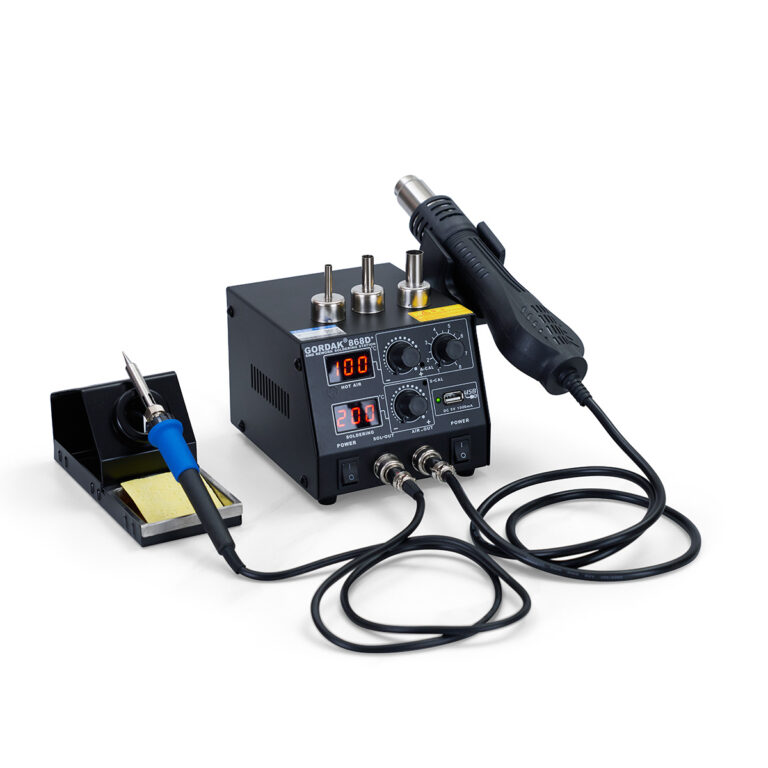
Essential Features of a Gordak Hot Air Soldering Station
Gordak’s hot air stations are designed for precision and reliability. Key features include:
- Adjustable temperature and airflow
- Digital control panel for accuracy
- A wide range of nozzle types
- Built-in safety systems for overheating and ESD protection
Step-by-Step Guide: How to Use a Hot Air Soldering Station
1. Set the Temperature and Airflow
Adjust your station’s temperature and airflow based on the component and PCB you’re working on. As a general rule:
- Temperature: 280–350°C
- Airflow: Low to medium for small components; higher for larger ones
Tip: Always refer to the manufacturer’s datasheet for thermal limits.
2. Choose the Right Nozzle
Select a nozzle that closely matches the size of the component. This ensures heat is concentrated where needed, reducing the risk of damaging adjacent parts.
3. Preheat the Area
For large or multi-layer boards, preheat the PCB to about 100–150°C to reduce thermal shock. Some professionals use a preheating plate for this step.
4. Heat the Solder Joint
Hold the hot air nozzle 3–5 mm above the component. Move the nozzle in a small circular motion to distribute heat evenly. It usually takes 5–10 seconds to soften the solder.
Tip: Do not stay too long on one spot—overheating can damage the board.
5. Remove or Place the Component
Once the solder is molten, use precision tweezers to gently lift or position the component. Be careful not to apply force.
6. Cool Down Gradually
Let the component and board cool down naturally to avoid sudden temperature changes, which could cause cracks or delamination.
Pro Tips for Better Results
- Practice on scrap boards before working on expensive PCBs
- Use quality flux to improve solder flow
- Inspect joints under a microscope after rework
- Keep your nozzles and filters clean
- Calibrate your station regularly
Common Mistakes to Avoid
- Using excessive airflow, which may blow away small components
- Setting temperatures too high
- Holding the nozzle too close to the PCB
- Neglecting ESD protection when handling components
Why Choose Gordak Hot Air Stations?
At Gordak, we provide high-performance soldering solutions trusted by professionals worldwide. Our hot air rework stations are engineered for precision, safety, and long-term reliability.
- CE-certified and quality-tested equipment
- Competitive factory pricing
- OEM/ODM support available
- Professional technical guidance
For inquiries, partnerships, or bulk orders, please contact us at info@gordakelec.com.
FAQs
The correct temperature depends on the solder type, PCB design, and component size. Start with moderate settings and increase gradually until solder reflows properly.
Yes. Excessive temperature, high airflow, or prolonged heating can damage PCB pads and nearby components.
Flux is highly recommended because it improves solder flow and helps reduce oxidation during rework.
No. Hot air and soldering irons serve different purposes. Hot air is best for SMD rework, while soldering irons are better for point soldering.
Conclusion
Mastering a hot air soldering station takes practice, but with the right settings, tools, and techniques, you can work like a true professional. Whether you’re assembling prototypes, repairing smartphones, or working on fine-pitch ICs, a quality hot air station from Gordak is a valuable asset to any electronics workstation.
Explore our full range of hot air stations and accessories today.
Email: info@gordakelec.com